

Using the offer button
$100 $200
Pay in 4 interest-free payments of $25
with  .
Learn More
.
.
Learn More
.
Size
Like and save for later
Add To Bundle
If you’re new to Poshmark making an offer may be something you wanna talk about. When making an offer go to specific item,scroll down to bottom of listing,you will see an offer button which is right next to the buy now button. Click offer button..enter dollar amount you would like to offer..you will see shipping cost & offer amount with your total..etc.once offer is submitted seller has 24 hrs to accept your offer. Most offers are accepted..welcome to Poshmark & have a great time Poshing! 💕
Shipping/Discount

Posh Protect: Buyer Protection Policy
Get your order as described or receive your money back. Learn More.

cjanders
likes this

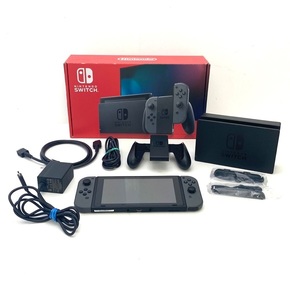






Find Similar Listings
About the seller

@lizfrumtn
Last Active: 3 hours ago
Tuscumbia, AL
301
Listings200+
Sold Listings1 day
Avg. Ship time54
Love NotesAbout the seller
@lizfrumtn
Last Active: 3 hours ago
Tuscumbia, AL
301
Listings200+
Sold Listings1 day
Avg. Ship time54
Love Notes
Account is under Review
Comment posting is temporarily restricted. Our team will reach out to you shortly. To understand why, select
Learn More.
